if you have an ipod or iphone or ipad or whatever then Please download the app “Make a Pose”
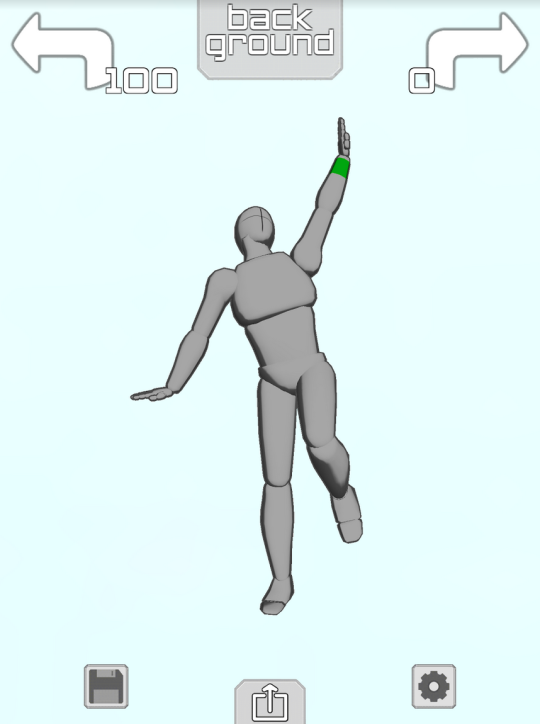
it gives you a lil figure like this
and you can make them do whatever you want!! Like
Took me about 1.4 minutes to make this sad little guy it’s Really easy to get the hang of
they Happy
you can change the camera angle so easy too so you can get perspective + foreshortening reference
THIS IS ALL FREE TOO but if you pay $2 you unlock the ability to have two figures onscreen at the same time so you can make COUPLE POSES
AND YOU CAN CHANGE THE LIGHTING,
you can also make rooms and place some objects or characters like so:
YOU WANT A CHARACTER W/ A BIGGER CHEST? HERE THEY ARE
YOU WANT A FRICKIN HORSE?
NEIGH NEIGH MOTHER FUCKER
ANYWAY YOU CAN PAY ABSOLUTELY $0 TO GET THE APP WITH THE ABILITY TO POSE ONE FIGURE AT A TIME AND IF YOU PAY $2 YOU GET TO PUT UP TO 6 CHARACTERS ON THE SCREEN AT ONCE AND YOU ALSO GET A GOTDAMN HORSE. again it is called “Make a Pose” and it’s for iphone or ipod touch or ipad and i cannot recommend it enough
So recently I came across a fellow artist who was struggling to find a free art program, and considering dropping the large amount of money for a Photoshop license. I know not everyone can afford such an expensive program, so I’ve compiled a list of programs with no cost to download and use.
Keep in mind all computers are different, so not all will work for everyone. Also, I’ve only ever used Windows, so for the most part, I’m not sure if everything will work for Mac. if in doubt check the website linked.
If you know more free programs, please add onto this!
OpenToonz has made many improvements since it’s initial release! (Windows & Mac)
Medibang Paint is a comic drawing software forked from FireAlpaca mentioned earlier in this post, and is available for mobile devices as well! (Windows, Mac, iOS, Android)
TVPaint, a 2D animation software, now has a free version available for android devices! It’s being used by more and more animation studios so now seems like a good time to explore it if you were ever interested
Artist friends, let me just tell you a thing. FUCK Wacom. Fuck Wacom and their planned obsolescence, fuck Wacom and their broken drivers, fuck Wacom and their over-priced tablets. For years we’ve dealt with them with no alternatives but let me tell you a thing.
I recently found out my Intuos 4′s Pen had broken and rather than spend £60-89 for a new one I decided to get a new tablet. Now, I could get the new “Intuos” (which is just the re-branded Bamboo) and i was going to until I found this beast.
This is the Huion
H610, it has almost twice the drawing space of the low-end Intuos and double the pressure levels. The one and only negative is that the pen requires a battery.
Not only that, it is larger than my Intuos 4 which I paid £150 for back in the day. Know how much this cost? £55. The same as the basic Intuos.
I am in LOVE with this thing. Let’s compare this with the lowest of the low end Wacom Intuos line.
Intuos Huion
Active Area: 6 by 3.7 in 10" x 6.25"
Pressure Levels:
1024 2048
Hard Input Res: 2540 LPI 4000 LPI
Express Keys:
4 8
Not to mention the Intuos is HIDEOUS with buttons that are in incredibly awkward places.
The fact that a £55 matches and exceeds the £150 Intuos 4 I bought years ago speaks worlds. And do you know what the very final nail in the coffin is?
THE DRIVERS. ACTUALLY. WORK.
It’s time Wacom had some real competition in the market, if you’re looking for a new tablet please consider a Huion over a Wacom. I used to be a Wacom fanboy too but now?
All I can find is good reviews on this thing and people doing the same thing I am doing, trying to convince people it’s worth it. So… You have the information, use it as you will.
Fck. I didn’t know they all did this. I thought I was getting a deal buying a Wacom but the driver refused to update after about a year and the pen died around the same time and replacing the pen was nearly as much as a whole new tablet so I bought a different brand. I ended up getting the Huion H610 shown above and it was definitely worth it. Other broke artists please save yourself the headache
I’m not an artist, but just a small correction for OP: it’s actually almost 3x the space. Each dimension is almost 2x as long, but the AREA is about 2.8x bigger. So you’re underselling it by saying it’s twice as big.
please get yourself a huon instead of a wacom
I bought a huion a while back and it’s pretty great.
I also have a Huion, and it’s served me well for quite a few years so far!
For reference, I have the GT-220, and it is absolutely incredible. I thought I’d never be able to have a tablet with a screen in it unless I shelled out £1500+ for an Intuos, and although I tried using a Bamboo, I just couldn’t get along with it, and I just assumed that that would be my life. I could either choose to draw well using traditional means, or I could have the ease of editing and correction that comes with digital art, but not both. There’s no way I ever could afford an Intuos.
But then I found this fucking thing, and now I can have my cake and eat it too because I’m drawing on the same surface that I’m looking at, but I’m also able to have the luxury of digital drawing and editing. It’s amazing! I’m delighted with it, and Huion’s customer service is fantastic, too. I’ve had driver issues once or twice, because Windows 10, of course I have, but they’ve been able to solve the problem quickly and painlessly every time.
I can’t recommend Huion enough.
I recently started using a Huion 680S myself after three (3) of my last Wacom tablets crapped out on me, all of them from frayed wires. And while I don’t regret the decision, I did want to mention that Huion tablets are a BITCH to get started. I had a hell of a time getting the drivers installed, and had to reinstall an older version of SAI because the newer one (with transparency) refused to work with it.
So while it’s a great alternative if you’re looking to break free from Wacom’s monopoly and works fine once you get it running, be prepared to wrestle with it first.
I draw for a living and was having horrible wrist pains from the strain of a smaller tablet. So I got a Huion, the one mentioned at the top of this post, and my wrist pain is almost entirely gone. I would have to work 12 hour days or ink all day to put the same stress on my wrist I was with my old wacom bamboo tablet just doing standard work.
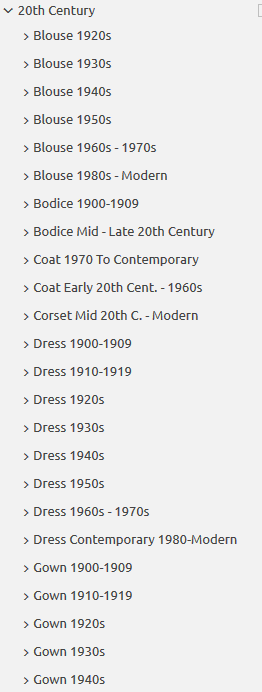
Do you design a lot of characters living in not-modern eras and you’re tired of combing through google for the perfect outfit references? Well I got good news for you kiddo, this website has you covered! Originally @modmad made a post about it, but her link stopped working and I managed to fix it, so here’s a new post. Basically, this is a costume rental website for plays and stage shows and what not, they have outfits for several different decades from medieval to the 1980s. LOOK AT THIS SELECTION:
OPEN ANY CATEGORY AND OH LORDY–
There’s a lot of really specific stuff in here, I design a lot of 1930s characters for my ask blog and with more chapters on the way for the game it belongs to I’m gonna be designing more, and this website is going to be an invaluable reference. I hope this can be useful to my other fellow artists as well! 🙂
Meg here, and welcome back to another round of TUTOR TUESDAY! This weeks topic was recommended byKisarii, thank you! Today we look at anatomy and some tricks that may make it easier to understand. This is a pretty vast topic so this is just Part One of The Human Body ( aka Gosh Darn Bodies are Da Best and Hands are the Worst ‘n’ We Gon’ Find Out Why)
Have any recommendations for tutorials? Send them on over to either this blog or my personal blog here! Keep practicing, have fun, and I’ll see you next Tuesday!







 ProbablyPartyPoison